• We’re currently investigating an issue related to the forum theme and styling that is impacting page layout and visual formatting. The problem has been identified, and we are actively working on a resolution. There is no impact to user data or functionality, this is strictly a front-end display issue. We’ll post an update once the fix has been deployed. Thanks for your patience while we get this sorted.

Email issues one for John Cloughie

John or anyone else.

Any idea why some of my regular incoming emails are going straight into my Junk box? Again this is only happening since Apple did their recent upgrade 🤬
Thanks DD
 
Sorry no, I have always thought that Apple mail is very poor. Setting rules is not logical imho. Drives me wild. I have considered moving to a third party provider. I may give Outlook a go. What I used to use at work. But them days the hard work was managed by an IT team.

Options here


John
 
Last edited:
I find blocked senders come through to my Apple devices from Hotmail and into my Junk, with the ā€œblockedā€ red circular sign clearly displayed. Yet I get no junk to my Gmail, or Yahoo accounts.
 
I find blocked senders come through to my Apple devices from Hotmail and into my Junk, with the ā€œblockedā€ red circular sign clearly displayed. Yet I get no junk to my Gmail, or Yahoo accounts.
I use Outlook (not Outlook365) and find that blocking senders just gets them diverted into the Junk folder so I find myself continually deleting them - I know the Junk folder auto-deletes after 30 days but I like to keep it clear so I can see emails from new suppliers which also go into Junk nuntil I identify them as trusted senders.
 
I just played about with this. When at work I was using full fat Outlook and detailed rules could be made which was great in order to organise.

Seems to me that in Apple and Outlook for iPad the user cannot set their own rules and the rules that direct to trash junk bin etc are not reliable.

I have found ā€˜Clean Email’ which looks good, but they want Ā£52/year.

I am going to try some other clients.

John
 
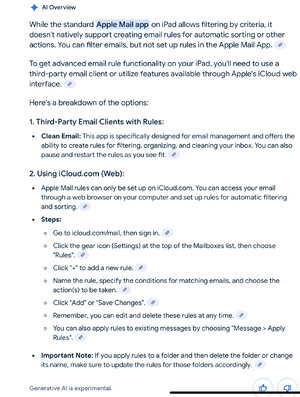
Just made a discovery which might help. Seems rules can be set for Apple Mail but only on the web. If so, the Apple Mail as a. Client, might work fine. I will give it a go.


JohnIMG_0601.jpeg
 
Last edited:
I’ve not found the Apple Mail rules very effective for my Hotmail account. One of my first morning tasks is download the Junk, press Edit, then Select all, then quickly scroll down to see if there’s anything relevant, if there is I click it from the Select All list, then commit the remainder to the Delete button. Takes less than one minute.
 
Thanks for the info John,

The sender concerned is a regular and all emails have until a few weeks ago gone into the inbox not the Junk as it now does.

I did a tweak last night whereby I annotated the sender as VIP. And amazing an email has appeared correctly in the inbox.
Not the solution but a temporary fix. All other Junk stuff is junk!
 

TRENDING THREADS

Latest posts

Back
Top