• We’re currently investigating an issue related to the forum theme and styling that is impacting page layout and visual formatting. The problem has been identified, and we are actively working on a resolution. There is no impact to user data or functionality, this is strictly a front-end display issue. We’ll post an update once the fix has been deployed. Thanks for your patience while we get this sorted.

Image size too large

Very frustrating on this forum every time I go to post an image it’s too large, from mobile or desktop.

If you are using an IOS device as you select your picture it gives the option ranging from original size to thumbnail. There was a thread about three months ago discussing this very point. I will try a search to find it.
 
I use an Android tablet when viewing this site and have downloaded an app called "Compress image" this works well for me. It automatically reduces the size of the picture to be able to load onto a thread.
 
Try this and if you look at #2 you will see several options all rated at 2.4mb but this is a glitch in forum software. Apart from original all are lower sizes.

 
Yes, I had that issue this morning on my iPhone. I edited the picture taking out all the unnecessary background by cropping the image and it worked perfectly.
I’m surprised that you have difficulty with an iPhone as my post above gives a link to the steps required. Never had an issue with any iOS device, but MAC OSX I have to reduce the size of tge photo using Preview.
 
I’m surprised that you have difficulty with an iPhone as my post above gives a link to the steps required. Never had an issue with any iOS device, but MAC OSX I have to reduce the size of tge photo using Preview.
I think of the 10 photos I took on my iPhone, 8 were too big. Could depend on the age of the phone of course and the image quality. Anyway, by cropping it solved the issue. 👍
 
I’m a dinosaur. But for years on here I know our normal photos don’t fit! Simply you will see you get asked about size. Just go for large not the full main size. It works and is covered somewhere in the users guide.
 
With an android phone its simple.

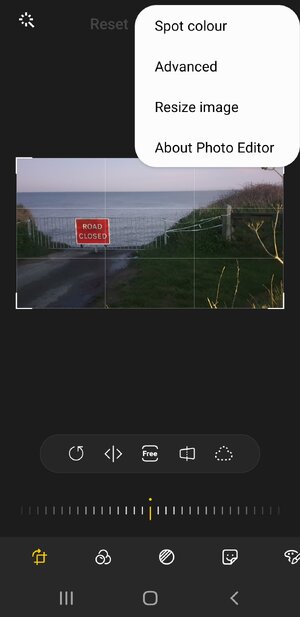
Select the photo you want in gallery, click on the ✏ pencil icon below the picture to edit. Click the three dots top right and select resize.

This will create a copy of the original but smaller file size.Screenshot_20230720-203505_Photo Editor.jpg
 
Unfortunately not all android phones or devices are the same. Cameras, camera apps and photo viewers can be very different.
 
I’m surprised that you have difficulty with an iPhone as my post above gives a link to the steps required. Never had an issue with any iOS device, but MAC OSX I have to reduce the size of tge photo using Preview.
I used to have problems with the iPhone until I realised the following.

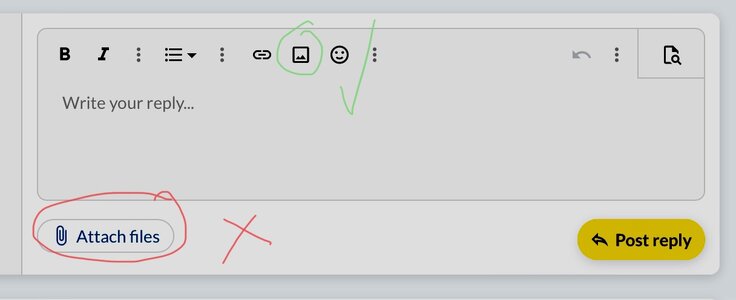
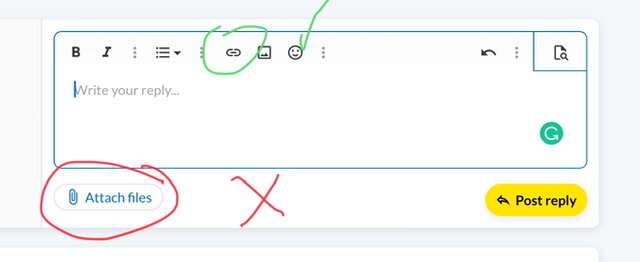
I don't know about Android but for iPhones and iPad, there are two options for uploading. If the bottom, 'attach files' is selected. then there are no size options. (So far as I know). But, if the top option is selected, The photo can be altered once chosen. Click where it says 'actual size' at the bottom of the picture.

IMG_1375.jpeg

John
 

Attachments

  • IMG_1374.jpeg
    IMG_1374.jpeg
    29.4 KB · Views: 14
Last edited:
On Windows 10 Just click on the pic then click see more (three Dots) drop box then I can resize either % wise or number of pixels I had to reduce this by 50% to get it to fit.

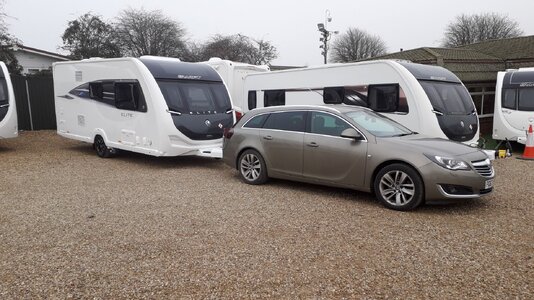
20221202_140704.jpg
 

TRENDING THREADS

Latest posts

Back
Top