• We’re currently investigating an issue related to the forum theme and styling that is impacting page layout and visual formatting. The problem has been identified, and we are actively working on a resolution. There is no impact to user data or functionality, this is strictly a front-end display issue. We’ll post an update once the fix has been deployed. Thanks for your patience while we get this sorted.

Posting Photos

Since the recent update of the system I cannot post photos off my iPad. The I phone is fine.
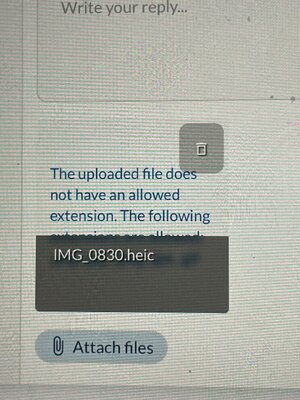
In the attached photo screen the following message appears
“The uploaded file does not have an extension….”

Help??
 
Let’s have a go.

IMG_4320.jpeg

It worked for me using the ribbon and using photos medium size.

IMG_0597.jpeg

John
 

Attachments

  • IMG_0597.jpeg
    IMG_0597.jpeg
    65.3 KB · Views: 0
Now on my iPhone here’s a photo of the forum on my iPad . Both are synchronised in the Cloud.
Beyond me,
 

Attachments

  • IMG_0873.jpeg
    IMG_0873.jpeg
    552.3 KB · Views: 3
You are trying to open an Apple photo format file.

Quote;

A HEIC file is a High Efficiency Image Container file, which is a type of image file format. HEIC files are used to store photos taken on Apple devices like iPhones and iPads.


There must be a reason why your phone is saving files in this format. I would look at photo settings.

It is possible to convert the heic file to a jpg

Look here.


John
 
You are trying to open an Apple photo format file.

Quote;

A HEIC file is a High Efficiency Image Container file, which is a type of image file format. HEIC files are used to store photos taken on Apple devices like iPhones and iPads.


There must be a reason why your phone is saving files in this format. I would look at photo settings.

It is possible to convert the heic file to a jpg

Look here.


John
It's the default setting for iPhone and allows for capabilities that JPG cant (like live pictures). To use a picture taken on an iPhone, you need to first "export" it.
Or - if you use the paper clip icon, pick the picture you want from your library and use the options icon (bottom right) to pick size and format, you can select an option that will work.
 

Attachments

  • IMG_3603.jpeg
    IMG_3603.jpeg
    94.1 KB · Views: 1
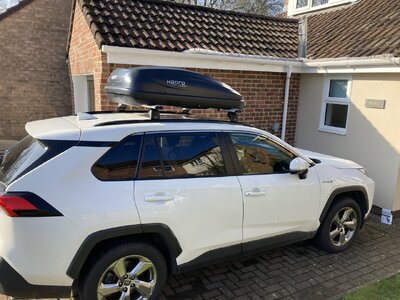
What’s baffled me is the photo taken with the iPhone will post on PCv using the phone. If I try the same photo which is stored in the cloud using the iPad it won’t work. There was a recent apple auto upgrade . Maybe that’s jiggered something up?
It’s not like I haven’t posted before
 
Today I had a problem posting a photo from MAC Sequia OS as it was greyed out. Yet when I used IPad IOS17 it allowed me to reduce size and then insert. The IPad IOS won’t go above 17 as it’s now getting on a bit. The MAC has had recent big update. But this one taken today has posted from IPhone iOS 18.

IMG_3760.jpeg
 
It's the default setting for iPhone and allows for capabilities that JPG cant (like live pictures). To use a picture taken on an iPhone, you need to first "export" it.
Or - if you use the paper clip icon, pick the picture you want from your library and use the options icon (bottom right) to pick size and format, you can select an option that will work.
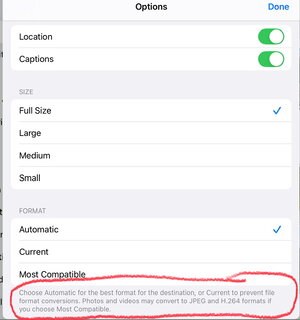
I always used to use the paper clip option. But it started giving problems, (I forget what they were). So I switched to the landscape option in the ribbon. Just tried the paper clip again and it seems fine. In doing so, I might have found the answer to Dusty’s problem. Look at the bit I have circled.

IMG_0598.jpeg
I just leave mine on automatic. But if Dusty has his switched to current that might be the problem.

John
 
Eureka👏👏👏You cracked it John👏

. When Apple did their last overnight upgrade I’d left the iPad plugged in and on. So,the upgrade was done automatically. Just checked and blow me the tick was on current not automatic. Why do these stupid upgrades that catches out people like me🙀
 
I just dragged my photo into the reply box and it uploaded fine, but I had to wait a moment before hitting post to make sure it had finished loading.
 

TRENDING THREADS

Latest posts

Back
Top